Biology

The Department of Biology prepares students for careers at the forefront of human health and environmental science. Undergraduate programs in Biology, Marine Biology, and Biomedical Sciences offer specialized pathways supported by expert faculty, state-of-the-art facilities, and hands-on research opportunities.
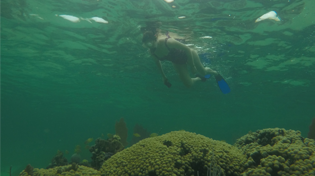
Students pursuing biomedical sciences work side by side with faculty investigating stem cell therapies, immune function, neurological disease, and the cellular mechanisms of human illness, with real opportunities to contribute to peer-reviewed research before they ever cross the graduation stage. Students drawn to marine and environmental science step into one of the most ecologically rich field settings in the country, with 300 acres of wetlands on the main campus and 150 acres of Gulf Coast barrier island ecosystems on Santa Rosa Island serving as living laboratories. Both paths lead to exceptional outcomes, whether that means earning a seat in medical, dental, pharmacy, or graduate school, or launching a career in conservation, fisheries, environmental regulation, or scientific research. The department is home to NIH-funded research and two NIH-supported scholar programs, reflecting a deep and sustained commitment to undergraduate science at the highest level.
If you are ready to explore, discover, and build a career in biology, there is a place for you here.
Biology News
-
Tue, 10 Mar 2026 13:30:00 +0000Tue, 10 Mar 2026 13:30:00 +0000UWF receives $555K NIH award to launch NeuroNauts Scholars Program
-
Mon, 21 Jul 2025 14:00:00 +0000Mon, 21 Jul 2025 14:00:00 +0000UWF’s Dr. Wade Jeffrey recognized by ScholarGPS as Highly Ranked Scholar
-
Mon, 02 Dec 2024 19:30:00 +0000Mon, 02 Dec 2024 19:30:00 +0000UWF faculty member awarded prestigious NIH grant to further Alzheimer’s research